It is the 10th of the month at a private school in Lahore. Thirty parents stand in line outside the fee office. The clerk hunts for challans across three registers. Meanwhile, 400 parents fire questions into one WhatsApp group. You sat through two software demos last week. Both looked exactly the same. So how do you pick the right one?
You should choose a school management system software on platform, not only just promises. The method is simple. You list your worst problems, test each School management software on the 12 points below and compare the full three-year cost in rupees.
Write Down Your Five Biggest Headaches First
A demo always shows the best side of a product. So you should write your five worst daily problems on one page before buying any SMS. Typical examples are late fees, lost diary notes and parents who call about the van every day. Each SMS must then fix those five problems live, in front of you.
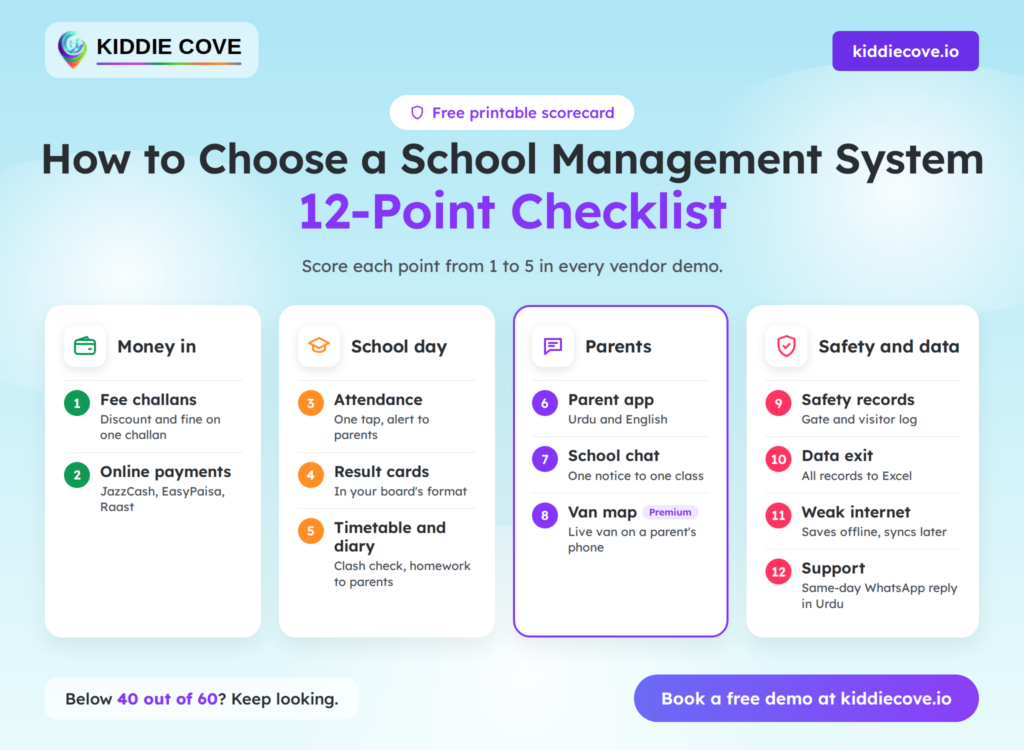
The 12-Point Checklist at a Glance
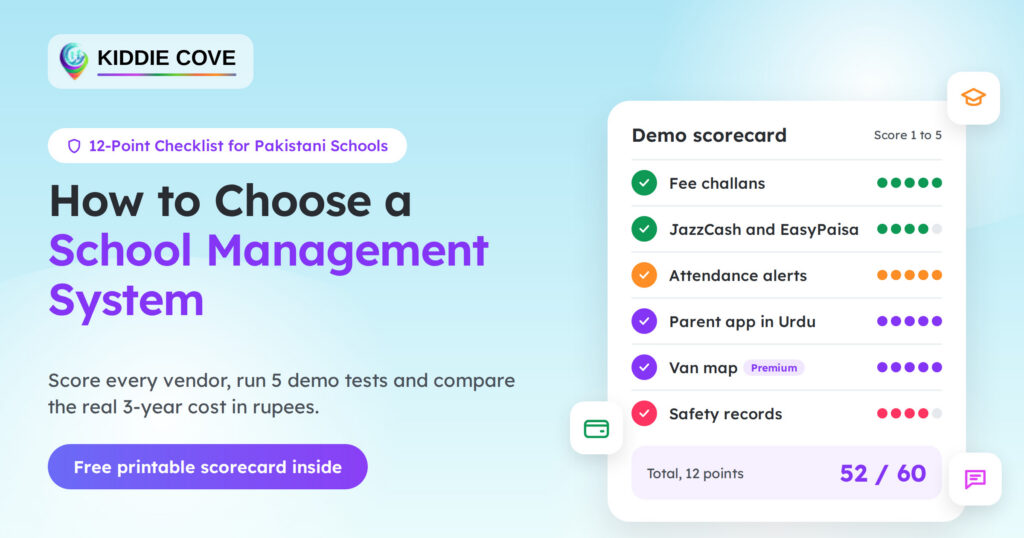
You can print the scorecard below and take it to every demo. You should give each point a score from 1 to 5. As a rule of thumb, a system below 40 out of 60 should not reach your shortlist.
Money In: Fees and Payments
| Sr.no | Point | Pass if the vendor can show you… |
|---|---|---|
| 1 | Fee challans | one challan with a discount and a late fine |
| 2 | Online payments | a live JazzCash, EasyPaisa or Raast payment on the ledger |
| 3 | Attendance | a full class marked in one tap, with alerts to parents |
| 4 | Result cards | a card in your board’s format |
| 5 | Timetable and diary | a clash check and homework sent to parents |
| 6 | Parent app | the app switched to Urdu |
| 7 | School chat | one notice sent to one class only |
| 8 | Van map (premium) | a live van on a parent’s phone |
| 9 | Safety records | today’s gate and visitor log |
| 10 | Data exit | all records exported to Excel |
| 11 | Weak internet | attendance saved offline, then synced |
| 12 | Support | a same-day WhatsApp reply in Urdu |
1. Fee Challans That Match Your Discounts and Fines
Most Pakistani schools run on sibling discounts, scholarships, and late fines. A weak system handles only one flat fee per class. So you should ask the SMS provider to print one challan with all three rules applied. KiddieCove’s fee management system builds challans by section and month, with student-wise discounts.
2. JazzCash, EasyPaisa and RAAST, Named and Working
The word “online” on a brochure proves nothing. You should ask which channels work today and watch a test payment reach the student’s ledger. Raast is the State Bank of Pakistan’s national instant payment system. It links banks, microfinance banks and licensed fintechs in real time.
The School Day, From Bell to Bell
3. Attendance in One Tap, With a Note to Parents
A teacher has about two minutes for attendance at the start of class. So the app should mark a full class in one tap and flag only the absent students. Their parents should then get an alert within minutes. A register filled in at lunch offers no safety at all.
4. Result Cards in Your Board’s Format
Your result card carries your school’s name into every home. So you should bring last term’s card to the demo. The SMS should rebuild it with marks, grades, positions, and remarks in your board’s format. Many systems print one foreign layout and stop there.
5. Timetable and Daily Diary
A timetable clash can put one teacher in two rooms at once. A good system flags that clash before you publish. The daily diary should then send homework to each parent’s phone by subject and date. Paper diaries get lost in school bags, unlike app notes.
Parents in the Loop
6. A Parent App in Urdu and English
Many parents in Pakistan prefer and read Urdu far more easily than English. So the parent app should switch languages in one tap. You should also test it on a low-cost Android phone. Many parents carry one.
7. One Safe Chat in Place of 20 WhatsApp Groups
School WhatsApp groups leak phone numbers and bury key notices under forwards. A proper school chat sends a notice to one class, one section or one parent. It also keeps a record of each message. Teachers no longer need to give out their own numbers.
8. Live Van Map and Pick-Up Alerts (premium)
The question “Where is the van?” can flood a school office every day. Kiddie cove provide Live school bus tracking lets parents see the van on a map and get an alert at pick-up and drop-off. You should expect it as a premium feature, not a free extra.
Safety, Data and Support
9. Punjab Safety Rules and Gate Records
Punjab has ordered every public and private school to install panic buttons linked to the PSCA Public Safety App. Staff must also update their school’s security status in the app three times a day. A school system should sit alongside that app and keep daily gate and visitor records. Our guide to Punjab school safety rules lists each step.
10. Your Data, Your Property: Backups and the Exit Door
Your student records belong to your school. You should ask how often the system backs up your data and where it stores the copies. Then you should ask the hardest question of all. Can we export every record to Excel the day we leave?
11. Power Cuts and Weak Internet
Power cuts and patchy signals still disrupt many school days in Pakistan. So you should ask what happens to attendance when the internet drops mid-class. A strong system saves the entry and syncs it later. A weak one simply loses it.
12. Setup Help and Support in Urdu, on WhatsApp
Your office staff will judge the system in its first week. The SMS should import your data, train each role, and answer questions on WhatsApp in Urdu. You should ask for a named support person and a same-day reply time in writing. A help desk that only answers emails is too slow for a school day.
Five Demo Tests That Expose a Weak System
Polished slides hide weak spots. So you should run these five tests in every demo, with your own data.
- One challan with a sibling discount and a late fine
- A test JazzCash payment that lands on the student’s ledger
- The parent app switched to Urdu on a low-cost phone
- Wi-Fi off, attendance marked, Wi-Fi back on, data synced
- A full export of student records to Excel
A School Software provider who dodges any test has already given you the answer.
The Real 3-Year Cost in Rupees
The monthly fee is only one line of the bill. A cheap plan with heavy extras often costs more by year three. So you should add up every cost below before you compare school software.
| Cost | What to ask |
| Setup or onboarding | Is it one-time, and does it include data import? |
| Messages | Are SMS or WhatsApp alerts included, or charged per message? |
| Student limit | What happens to the price at your next student band? |
| Payment charges | Who pays the gateway fee, the school or the parent? |
| Staff lessons | Are later sessions for new staff free? |
| Premium features | Which plan includes the live van map? |
For example, KiddieCove’s Growth plan costs PKR 4,999 a month for up to 300 students. That comes to PKR 179,964 over three years, before any extras.
Red Flags That Should End the Demo
Some warning signs should end the talk at once. Any one of them puts your school’s money or records at risk.
- No public price and no written quote
- A contract that locks your data inside the system
- “Online payments” with no named channel
- Support by email only
- Pressure to sign before you test
Which Kind of System Fits Your School?
A Montessori with 80 children does not need the same system as a campus with 600 students. So you should match your shortlist to your school type.
| School type | Focus on first | Can wait |
| Small school, under 300 students | Fees, attendance, parent app | Multi-campus reports |
| Montessori or daycare | Pick-up alerts, daily notes, parent chat | Board-format result cards |
| Large school or multi-campus | Branch reports, audit trail, van map | Very little |
When Should You Switch?
Punjab’s 2026–27 school session opened on April 1. Summer break then ran from June 1 to July 31. So you should avoid a switch during exams, admissions and the first weeks of a session. The summer break gives your staff the calmest window to import data and learn the system.
How KiddieCove Scores on the 12 Points
You should hold KiddieCove to the same test as every other school management system. Here is where it stands today.
| Point | KiddieCove |
| 1. Fee challans | Yes, by section and month, with student-wise discounts |
| 2. Online payments | JazzCash and EasyPaisa. Raast listed as upcoming |
| 3. Attendance | Yes, by class and section, with reports |
| 4. Result cards | Exam and result cards. Bring your board format to the demo |
| 5. Timetable and diary | Yes, with clash checks and a daily diary |
| 6. Parent app | Android and iOS, in Urdu and English |
| 7. School chat | Yes, with read receipts |
| 8. Van map | Live GPS map on the Academy plan |
| 9. Safety records | Gate and attendance checks, built to run alongside PSCA |
| 10. Data exit | Ask for a live export in the demo |
| 11. Weak internet | Ask for a live offline test in the demo |
| 12. Support | Onboarding help, plus a dedicated account manager on Academy |